The start of 2026 seems to be the year where AI-written code is getting widespread acceptance. Linus Torvalds, DHH, Robert Martin, and ESR, for example, had expressed how nowadays AI is writing their code:
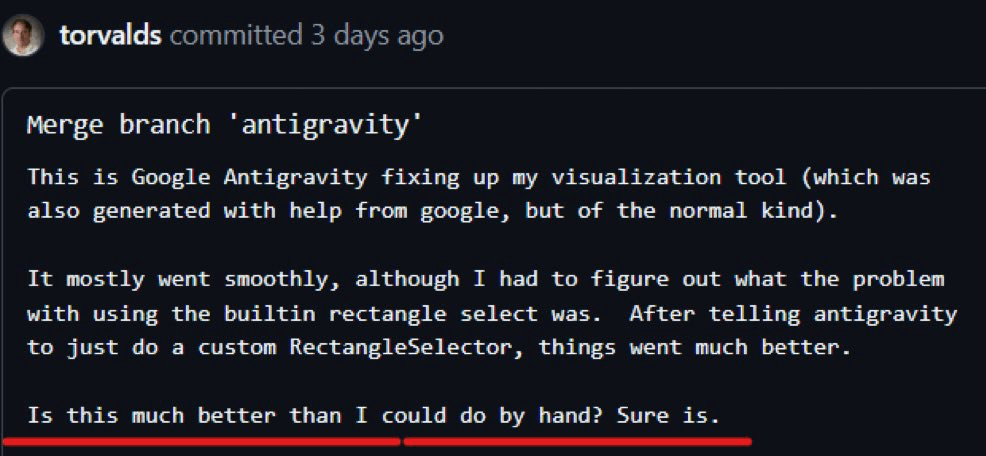
The code quality seems to have improved a lot, so naturally I want to test this. In the past, I have used AI as a Google replacement. It served as a rubber ducking companion as well. Additionally, it acted as a code completion assistant. Yet, I never really let the AI fully write the code on its own. Until now.
To test this, I planned to create a year-day counter Android app. The app’s idea is something around mindfulness: show days in a year as dots, and mark days that have passed. It is meant a reminder to see how much days are left in a year, to not waste time.
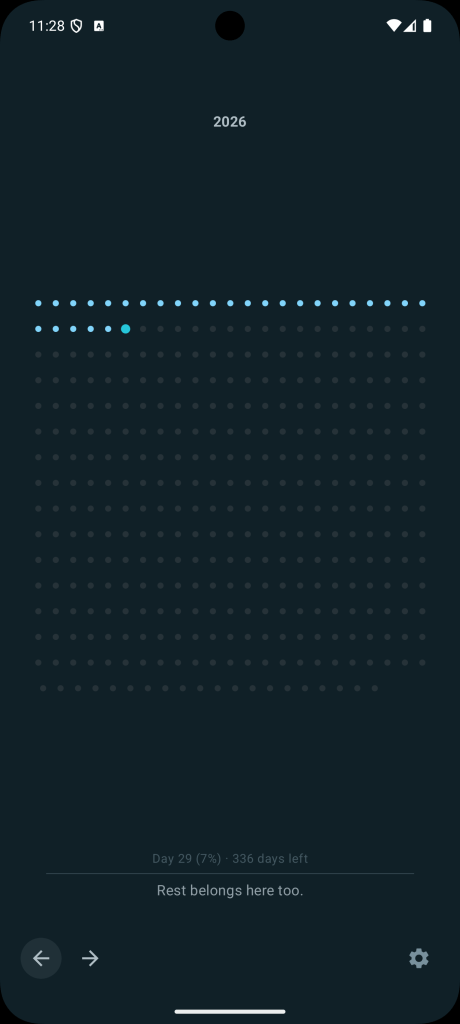
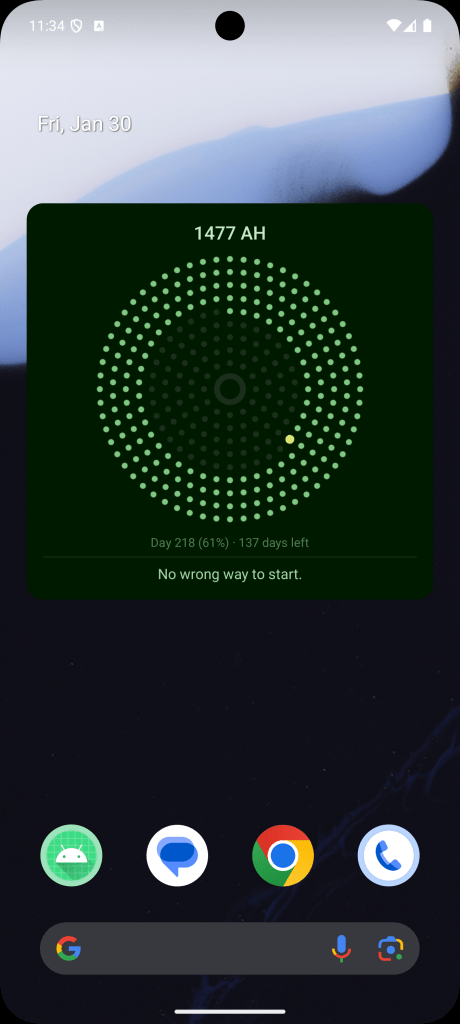
The app includes several different features like layout options and color schemes. Various customizations are also added that increase the project’s complexity. In total, for a version 1, the project size is about 5,000 LOC and 1,500 lines of documentation (more on this later).
Setup
I used two different providers for this test:
- Claude Code using Claude Opus 4.5, running in Terminal inside Android Studio.
- Google Gemini 3 Flash running in Antigravity.
For developing Android apps, both models feels pretty capable. Google’s Gemini 3 Flash feels slightly more knowledgeable with Kotlin and Android development. On the other hand, the workflow of Claude Code feels more ergonomic, although perhaps this is more a question of familiarity on my side and the relative newness of the latter as well. In terms of code quality, I feel comfortable using them interchangeably.
The project also requires some kind of creativity, where I asked the AI to come up with various interesting dot layouts. In this area, I find Gemini to be more capable of creating interesting layouts. It also excels at providing the mathematical formulas needed to draw them. It is also better at translating my layout idea into visual output.
(A little ding against using Gemini 3 Flash, though, is that I ran into a limit and the limit re-opening date was over a week in the future. This was a surprise, as I am more familiar with Claude Code’s several hours stoppage limit. I was lucky that I have an alternative model to use, otherwise having to wait several days would have messed up my planning).
Planning and Documenting
Why planning?
After several days of trial and error, I now firmly believe that planning and then writing down that plan are the most crucial part of coding with AI. Planning is important for two reasons:
- For AI to work well, it needs to follow directions that are written as specific as possible.
- Context size of a model is still very limited.
While AI can follow vague directions, the end result can often be wrong or inaccurate. This is because AI is still prone to hallucination (I’ve had AI call a function that it forgot to write), or do tasks that are not assigned to it but it thinks it has to do. By writing the plan and sweating out the details beforehand, it helps with the execution phase. In my experience, the planning phase can take between 30%-50% of the actual development time. This is fine because the execution phase can be surprisingly fast given a detailed enough plan.
The limited context of AI means that in practice I have to constantly open new sessions when working on something. In general it seems better to have AI start fresh whenever possible, despite the existence of features like /compact in Claude Code to summarize existing conversation. From what I can tell, having AI work longer and longer on something seems to degrade the quality of both the thinking and output.
In practice this is not a surprise, because even when I write code on my own, I have to consciously reduce a task into sub-tasks that are small enough for my mental model to fit. Now I’m doing it also to help manage the AI’s context size, and I find the analogue quite useful.
The issue with starting AI afresh, though, is that it needs to be taught all over again about the current task. This is solvable by having plenty of documentation/planning documents. Having AI reading those documents at the beginning gives a good starting point before executing a task.
How to plan
In general I find it useful to have three types of documentation:
- claude.md (or the equivalent): The usual document for best practices and development flow the AI has to follow. How to commit, check for issues, run tests, etc.
- A readme.md file at the root of the project. Outlines what the project is about, what features it has, what are the important files and what they do, and so on. This is the entry point for an AI model to get learn about the project. It must be a living document, and each time an AI finishes a task, I ask it to update the readme.md with the latest information related to that task.
- A plan document for any significant task, for example when adding a feature or bug fix. There’s no specific rule except that it’s better to err at creating too many documents than too little. Once a plan has been finalized, I ask the AI to estimate many commits it would take to complete it and then to create a to-do list out of it. When a plan is completed, I also ask the AI to update the plan document.
My workflow loop for a task starts with the planning phase. After asking the AI to read the readme.md file and any relevant/similar planning documents, I then talk with the AI about the idea that I have, then we work together to generate the plan.
Both models have planning mode here that works perfect for this use case, and Claude Code has useful tools like “ask user questions” that will help drill down and find use cases and unearth unknowns related to the task. In general, I aim to be as detailed as possible and have the AI generate a plan-feature-name.md document for the result.
After everything feels good enough, I end the session and start a new session for the execution.
Execution
The execution phase starts with asking the AI to read the readme.md file and the relevant planning document. Assuming they are written with enough details, this will have prepared the AI enough to start writing the code.
In the past I used to ask the AI to stop prior to committing something, and I would read the code first and commit myself. For this experiment, I ask the AI to write the commit itself and just continue following the to-do unless there is anything it needs to ask me about. It goes reasonably well with properly added requirements in claude.md (ensure the project builds properly and passes lint before committing, and so on).
An efficiency problem I find is when the task is related to UI development. I have not explored how to get the AI to do visual checks, so I usually ask the AI to stop and let me know so I can do manual checking.
Eventually, assuming the plan is detailed enough for the AI to follow, the task will be finished. In an environment with multiple developers, this would have moved into the PR review step, but for this experiment I am working alone, so the code gets added immediately.
Aside: I do have experience having AI work on PR reviews. In general it worked suprisingly well: a PR is a well-contained context with good documentation (assuming the PR description is good) and proper history (assuming the commit history is good and the message is clear), so a freshly started AI session can learn from them easily. Then, the AI can use that knowledge to do further revisions based on the change requests.
By following this workflow, I was able to get the app finished, and it’s now getting ready to be submitted to the Play Store.
Future Notes and Unresolved Points
These are some disjointed notes and thoughts that came to mind during development.
Understanding AI-written code is something I need to figure out to do efficiently. I can read and understand the code, but there is not much of a productivity gain if code can be written quickly but takes long to read, review, and compare with the documentation. Something like creating diagrams might be good to look at. A better solution might be to build an AI workflow to verify and check code, so I don’t have to review them unless absolutely necessary. People working at the frontier seems to have foregoed reading code completely, fully trusting the AI to do the work (e.g: the Clawdbot inventor):
Understanding AI-written code is something I need to figure out to do efficiently. I can read and understand the code, but there is not much of a productivity gain if code can be written quickly but takes long to read, review, and compare with the documentation. Something like creating diagrams might be good to look at. A better solution might be to build an AI workflow to verify and check code, so I don’t have to review them unless absolutely necessary. People working at the frontier seems to have foregoed reading code completely, fully trusting the AI to do the work (e.g: the Clawdbot inventor):
The workflow I come up with creates a lot of documentation. This is good, but it’s also a lot of reading material for my human brain. At some point I worry I have to return to them to figure out some bugs and I dread having to pore through them, although I suppose AI can also help with this. There could be a better way to organize them better for future retrieval.
AI talks a lot, and it’s fatiguing to read their messages. Asking them to talk shorter and yap less do work, but mentally it still feels like trying to communicate with something that can talk much, much faster than I can process. I find myself actually enjoying the limit time, as it gives my brain time to rest.
Often, the speed of which the AI writes the code makes it harder for me to catch up with the planning and thinking aspect. It almost feels like I am the bottleneck in this whole process. Bob Martin shared the same sentiment:
Nevertheless, being the bottleneck seems like a good thing. Being fast all the time leaves little time for thinking and retrospecting, as well as increases fatigue. I even enjoy being rate-limited by Claude from time to time, as it allows me some breathing space and I feel confident enough that I can pick up things quickly once the limit is lifted.
Finally, I am not sure about the effect of agentic coding for people starting to learn programming. I am relatively experienced in this field, but I’m thinking for example about my son, who is starting to learn programming. Agentic coding still requires you to know programming enough to ensure: 1) you know what you want to be done, and 2) you know that it is done correctly. Junior developers don’t have the experience to know those things yet, and traditionally you get that knowledge by writing code on your own and by seeing things work or break.
Conclusion
Letting AIs write the code, in 2026, seems to be a mostly solved problem. In terms of syntax and best practices, they know well enough what to do. They can also write and re-write very quickly, so iterating on something is something they can do well.
From what I can see, it’s inevitable that agentic coding will change how programmers work, where humans will not be writing most code anymore. It feels like we are all still in the phase of figuring out how to efficiently navigate this change and to come up with the best practices, but the direction is already clear.
Personally, I am quite happy with this change. First, it feels like I am still coding, but in English. Just the way the compiler turns my Kotlin code into something a machine can understand, the AI interprets my English sentences into code that the compiler can use. It’s moving the abstraction one layer up, and to me it makes programming more enjoyable.
Second, “coding” does not feel like the right word to describe what I’m doing now. I am simply “making” software. It is indeed a better use of my time to think about the usefulness of a piece of software and how to translate human needs into features, rather than the inner details of a programming language, so it is perfectly fine.
I still think that the actual planning and direction have to be human-led, at least for a piece of software that is meant for human use. AI still can’t match the lifetime of empathy and tactile experience that I share with the rest of humanity.
In this case, taste and consideration become more and more mportant. A programmer (or, maker) will still have to make decisions about many big and little aspects of the app.
In the end, this feels like an exciting change, and it’s something worth keeping an eye on. There is not yet any consensus on what is the most efficient workflow in agentic coding, and new techniques and ideas seem to appear every week, so it feels best to stay open minded and test things for yourself.
I believe the world still needs a lot of software in different aspects of life, so if agentic coding helps with that need, I am all for it.
 Hafiz Rahman
Leave a comment