I’m building a Quran reading and habit building app, Steady Quran. This week, I ran into one of those bugs that looks trivial on the surface. However, it turns out to touch some genuinely interesting Unicode internals.
The symptom: Arabic paragraphs in a tafsir (Quranic commentary) were rendering left-to-right. Characters were shaped correctly — the Arabic ligatures looked fine — but entire lines were pinned to the left edge of the screen, reading from left to right. Here’s how it looks:
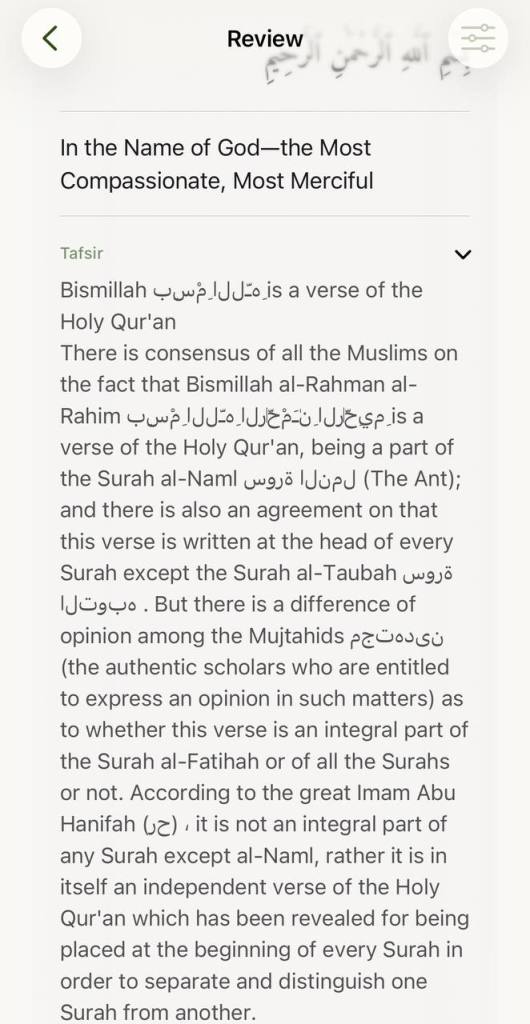
Here’s what I learned fixing it. Note that I’m not sure if this fully fixes everything. Different sources of tafsir seem to have their own formatting. They potentially have issues, too.
The Setup
The app bundles several tafsir editions offline. Maariful Quran is one of the most widely-read English-language commentaries. It has a specific structure that triggered the bug. Its entries open with English prose. Then they quote the Arabic ayah and continue in English. A typical entry looks like:
The Sūrah opens with the statement that...بِسۡمِ ٱللَّهِ ٱلرَّحۡمَٰنِ ٱلرَّحِیمِIn the name of Allah, the Most Gracious...
Rendering was done with a single SwiftUI Text view:
Text(tafsirText) .font(.system(size: textSize)) .foregroundStyle(AppColor.text) .lineSpacing(5)
And that single Text call was the root of the problem.
Why SwiftUI Gets It Wrong
SwiftUI’s Text uses the Unicode Bidirectional Algorithm (UAX #9) to determine text direction — which is correct and expected. The algorithm works by scanning for the first strong directional character in the text to establish the paragraph base direction.
Since the Maariful Quran entries open with English, the first strong character is LTR. The entire Text block is therefore treated as an LTR paragraph. Arabic lines get rendered right-to-left in terms of character ordering — the glyphs themselves are correct — but the lines are placed from the left edge of the container, which makes them look completely wrong.
The Unicode spec calls this a “paragraph base direction” problem, and it matters a lot for mixed-direction text.
The First Attempt: RLM (U+200F)
The obvious first fix was to prepend a Right-to-Left Mark (U+200F, “RLM”) before each Arabic-starting line. RLM is a zero-width character that acts as a strong RTL directional hint.
.replacingOccurrences( of: "(?m)^(?=[\\u0600-\\u06FF])", with: "\u{200F}", options: .regularExpression)
This didn’t work.
RLM is what Unicode calls a weak directional hint at the paragraph level. It can nudge the algorithm, but it cannot override an already-established LTR base direction. Because the paragraph had already been resolved as LTR (from the English opening), the RLM was essentially ignored for alignment purposes. The Arabic characters still rendered in the right order internally, but the line was still left-aligned.
The Second Attempt: Directional Isolates (U+2067 / U+2069)
My next instinct was to use Directional Isolates, introduced in Unicode 6.3 (UAX #9, Section 2.2). The relevant characters are:
U+2067— RLI (Right-to-Left Isolate): opens an independent RTL contextU+2069— PDI (Pop Directional Isolate): closes it
The key word is isolate. Unlike embedding characters (RLE/LRE), isolates are completely independent of the surrounding directional context. Whatever direction is established outside, inside the isolate everything is RTL. The BiDi algorithm processes the isolate as a single unit with its own base direction.
// Wrap each Arabic-starting line in RLI...PDIreturn "\u{2067}\(line)\u{2069}"
This was closer — character ordering within the isolate was correct and isolated from the outer LTR context. But there was still a problem: alignment.
The isolate controls how characters are ordered within its span. It does not control how that span is positioned within the containing line box. The paragraph’s base direction (LTR) still governs where each line gets placed — left edge.
So I had correctly-ordered RTL text, still sitting on the left side of the screen. Still wrong.
The Fix That Actually Worked
The real solution required stepping outside the Unicode BiDi algorithm entirely and handling it at the rendering layer.
Instead of using one Text view for the entire tafsir string, I split the text on newlines and rendered each paragraph as its own Text, applying the correct layoutDirection environment value per line:
@ViewBuilderprivate func tafsirBody(_ text: String) -> some View { let arabicRange = Unicode.Scalar(0x0600)!...Unicode.Scalar(0x06FF)! VStack(alignment: .leading, spacing: 0) { ForEach(Array(text.components(separatedBy: "\n").enumerated()), id: \.offset) { _, line in if line.isEmpty { Color.clear.frame(height: 12) } else { let isRTL = line.unicodeScalars.first.map { arabicRange.contains($0) } ?? false || line.hasPrefix("«") Text(line) .font(.system(size: textSize)) .foregroundStyle(AppColor.text) .lineSpacing(5) .multilineTextAlignment(isRTL ? .trailing : .leading) .frame(maxWidth: .infinity, alignment: isRTL ? .trailing : .leading) .environment(\.layoutDirection, isRTL ? .rightToLeft : .leftToRight) } } }}
Each Arabic paragraph now gets .environment(\.layoutDirection, .rightToLeft), which sets the paragraph base direction explicitly — not via the BiDi algorithm, but at the SwiftUI layout level. The line is right-aligned and characters flow correctly.
English paragraphs are untouched. Empty lines become a fixed-height spacer so paragraph spacing is preserved.
Why Each Layer Failed Alone
It’s worth being precise about what each approach actually does and why each was insufficient on its own:
| Mechanism | What it does | What it doesn’t do |
|---|---|---|
| RLM (U+200F) | Weak RTL directional hint | Cannot override established paragraph base direction |
| RLI/PDI (U+2067/U+2069) | Isolates content with independent RTL direction | Does not affect line alignment within the outer LTR container |
.environment(\.layoutDirection, .rightToLeft) | Sets paragraph base direction at the layout level | N/A — this is the actual fix |
The distinction between character ordering and paragraph alignment is subtle but important. The BiDi algorithm governs the former; SwiftUI’s layout engine governs the latter. You need both to be RTL for a line to look correct.
The Guillemet Case
One more wrinkle: Arabic quotations in this tafsir edition are sometimes wrapped in guillemets — «like this». The opening « is a neutral character (not strongly directional), so lines like «بِسۡمِ ٱللَّهِ» would also default to LTR.
The fix handles this with a simple hasPrefix("«") check alongside the Arabic scalar range test. Both cases get wrapped in the RTL layout environment.
Takeaway
If you’re rendering mixed Arabic/English text in SwiftUI and individual lines are aligning to the wrong edge:
- Don’t rely on RLM — it’s a weak hint and won’t override a paragraph base direction set by earlier content.
- RLI/PDI solves ordering, not alignment — useful in some contexts, but not sufficient when the paragraph container itself is LTR.
- Split on paragraph boundaries and set
layoutDirectionper paragraph — this is the correct fix. Each paragraph needs its ownText(or equivalent container) with an explicitlayoutDirectionenvironment value.
The Unicode BiDi algorithm is sophisticated and correct, but it operates on character sequences, not layout boxes. Once you hit the rendering layer, you need to communicate direction to the layout engine directly.
 Hafiz Rahman
Leave a comment